Sprite Maker II1
Publisher Description
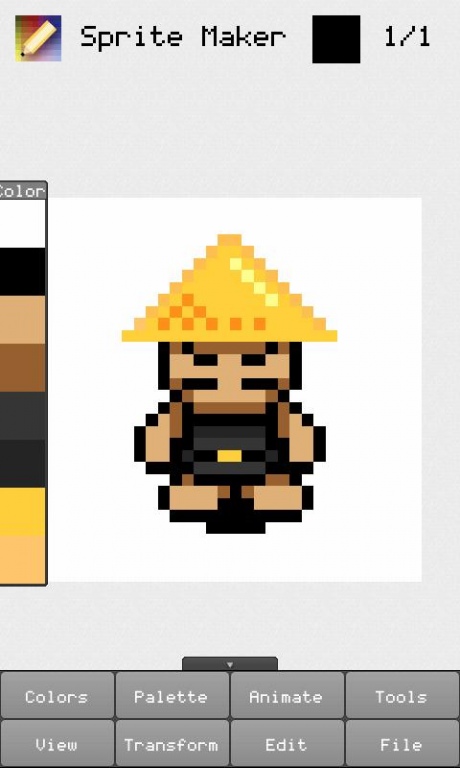
This application will allow you to easily make small sprite animations on the go. Anyone who loves retro games will enjoy creating and animating custom sprites.
Tools: Pencil, brush, bucket fill, rectangle, eyedropper
Fuctions: Add, delete, copy, paste, flip, undo, redo
Colors: 128 colors from the atari palette, custom color selector, transparency
Navigating
Pinch the screen to zoom in or out and use two fingers to move the canvas.
Panels
Show or hide a panel by choosing one the View menu. You can also move panels around
by dragging them from the top
File Saving
The images are saved in the Sprite Maker folder on your SD card. When you save a project,
a .png file is created containing each of the frames in a row. You can also choose to create
an animated .gif, although these can't always be played in the Android gallery.
FeedBack
Please e-mail me any questions or suggestions.
Disclaimer
Although this application has been succesfully tested on various devices, I can't
guarentee it will run perfectly on every phone.
About Sprite Maker II
The company that develops Sprite Maker II is Rebi. The latest version released by its developer is 1. This app was rated by 15 users of our site and has an average rating of 3.0.
To install Sprite Maker II on your Android device, just click the green Continue To App button above to start the installation process. The app is listed on our website since 2013-11-05 and was downloaded 305 times. We have already checked if the download link is safe, however for your own protection we recommend that you scan the downloaded app with your antivirus. Your antivirus may detect the Sprite Maker II as malware as malware if the download link to com.rebi.spritemakerpro is broken.
How to install Sprite Maker II on your Android device:
- Click on the Continue To App button on our website. This will redirect you to Google Play.
- Once the Sprite Maker II is shown in the Google Play listing of your Android device, you can start its download and installation. Tap on the Install button located below the search bar and to the right of the app icon.
- A pop-up window with the permissions required by Sprite Maker II will be shown. Click on Accept to continue the process.
- Sprite Maker II will be downloaded onto your device, displaying a progress. Once the download completes, the installation will start and you'll get a notification after the installation is finished.
Program Details
System requirements
Download information
Pricing
Version History
version 1
posted on 2013-11-05
version 1
posted on 2012-11-05
Several fixes and updates
